> ## Documentation Index
> Fetch the complete documentation index at: https://docs.beltic.com/llms.txt
> Use this file to discover all available pages before exploring further.
# Fintech Company Using Beltic
> A complete data flow walkthrough — from user signup through transaction authorization. What your backend calls, what your user sees, and where Beltic fits at every step.
## Products Used in This Guide
Everything in Beltic is built around the **Workflow API**. A workflow is a pipeline of verification blocks — document checks, liveness, sanctions screening, business lookups — that you configure once and trigger with a single API call.
**Credentialing is one of those blocks.** Add a `credential_issue` block to your workflow and Beltic automatically mints a signed JWT from the verified output. That credential travels with the user from onboarding through every future transaction — no re-verification needed.
If you already have your own verification process, you can skip the workflow and call the **Credentials API** directly. Send Beltic the data you've collected and it wraps it in a signed, portable credential. Same trust layer, without changing your existing pipeline.
This guide uses both — the Workflow API at onboarding to verify and credentialise in one call, and the Credentials API at transaction time to verify the credential against the payment context.
***
## The Setup
You're a developer at a fintech company — a stablecoin wallet, a card issuer, a payment platform. You need to verify users before they can transact, and you need to check their authorization on every payment they make.
You call Beltic at exactly two moments:
1. **At signup** — verify the user, handle the result, get them onboarded as fast as possible
2. **At every transaction** — verify their credential with transaction context and sending an attestation with verification, authorization and transaction, downstream
Everything in between — the verification logic, document checks, sanctions screening, credential signing, revocation infrastructure — runs inside Beltic. Your backend makes API calls. Your product owns the UX.
***
## Part 1: User Onboarding
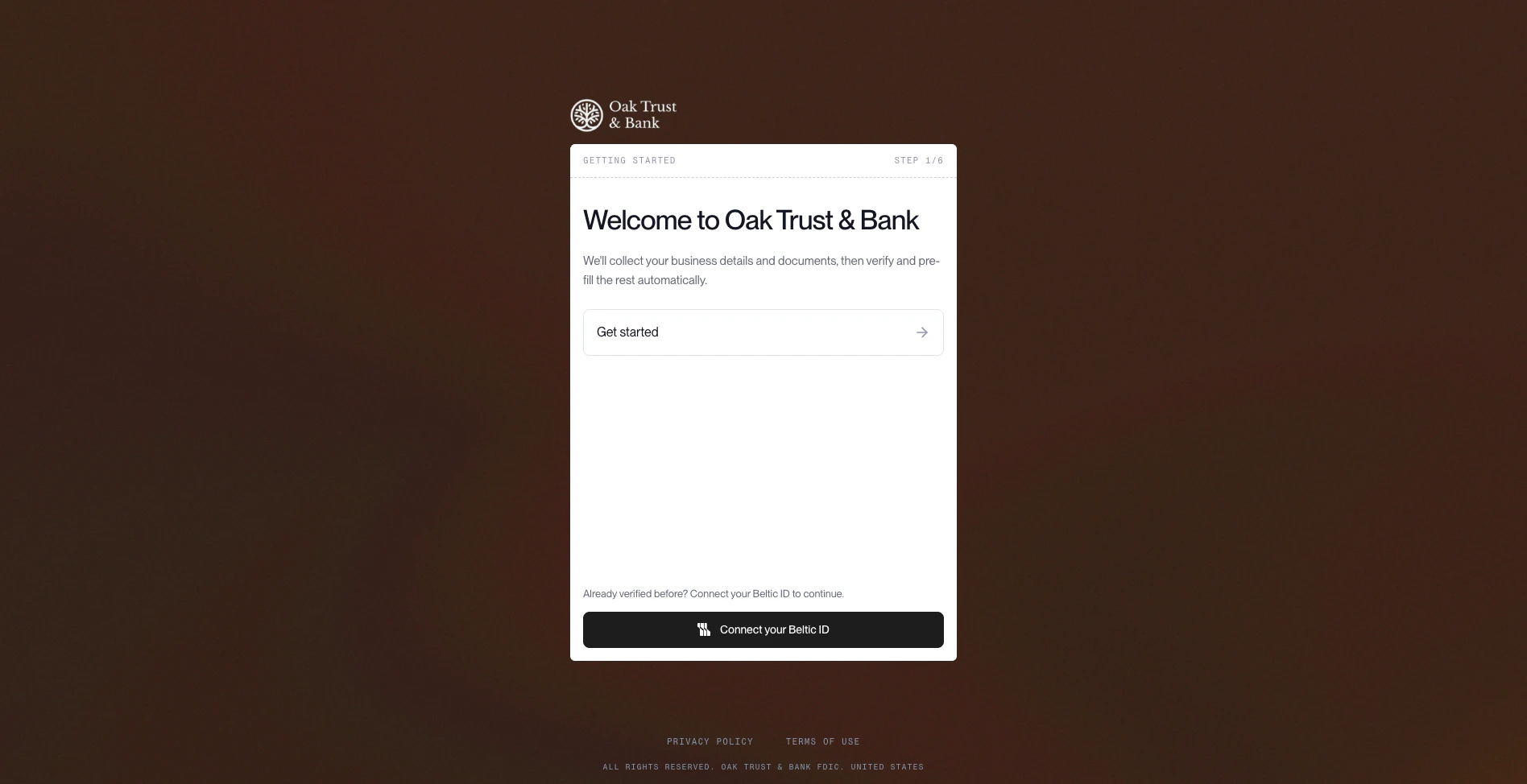 ### What your user sees
The user opens your app and signs up. They fill in their details, upload a document, and hit submit. They see a loading state. Seconds later they're either in — or they see "we're reviewing your application."
That's it. Two outcomes, both handled by a single API call.
### What your backend does
The moment the user hits submit, your server calls `POST /v1/workflows/execute`:
```bash theme={null}
curl -X POST https://api.beltic.com/v1/workflows/execute \
-H "X-Api-Key: $BELTIC_API_KEY" \
-H "Idempotency-Key: $(uuidgen)" \
-H "Content-Type: application/json" \
-d '{
"workflowId": "wf_kyc_standard",
"options": {
"input": {
"subject_id": "user_jane_doe_001",
"entity_type": "person",
"document_type": "passport",
"document_front_url": "https://your-storage.com/docs/jane_passport_front.jpg",
"jurisdiction": "US"
}
}
}'
```
Beltic runs the verification pipeline — document check, liveness, sanctions screening — and responds. The whole thing takes seconds.
Replace `wf_kyc_standard` with the ID of your own workflow. When setting up a workflow in the Console, you choose its name — that name becomes the `workflowId` you pass here.
***
### Outcome A: User approved immediately (`200`)
Beltic returns `200`. The workflow completed. The document checked out, sanctions came back clear, all policies passed.
```json theme={null}
{
"success": true,
"status": "completed",
"executionId": "exec_01HQ7P4...",
"output": {
"identity_check": {
"status": "passed",
"trust_level": "idv_verified"
},
"sanctions_screening": {
"status": "clear"
},
"credential_issue": {
"credential_id": "cred_01HQ7P4M...",
"credential_type": "user",
"signed_payload": "eyJhbGciOiJFUzI1NiIs...",
"status": "active",
"issued_at": "2026-05-22T10:30:00Z",
"expires_at": "2027-05-22T10:30:00Z"
}
}
}
```
**Your backend:** store `credential_id` and `signed_payload` against the user record. Mark them as verified. Grant account access.
**What the user sees:** the loading state resolves, they're in. Total time from submit to access: seconds.
The `signed_payload` is a signed JWT that carries the user's verified claims. You'll use it at every transaction from here.
***
### Outcome B: Sent to sponsor bank review (`202`)
Beltic returns `202`. The workflow hit a policy check it couldn't resolve automatically — a jurisdiction that requires sponsor bank sign-off, a document edge case, a rule mismatch between your policy and your bank's policy. The workflow has paused and is waiting on external input.
```json theme={null}
{
"success": false,
"status": "paused",
"executionId": "exec_01HQ7R...",
"pausePoints": [
{
"blockId": "sponsor_bank_review",
"reason": "policy_mismatch",
"description": "Subject's jurisdiction requires sponsor bank sign-off",
"requiredInput": ["approval_reference", "reviewer_id"]
}
]
}
```
**Your backend:** store the `executionId`. Mark the user as `pending_review` in your database.
**What the user sees:** "We're reviewing your application — we'll notify you once it's approved." They don't know about the sponsor bank. They don't need to.
### Resuming after sponsor bank approval
Your bank reviews the user's application out-of-band and sends you an approval. When that comes in, you resume the workflow by calling execute again with the `runFromBlock` parameter:
```bash theme={null}
curl -X POST https://api.beltic.com/v1/workflows/execute \
-H "X-Api-Key: $BELTIC_API_KEY" \
-H "Content-Type: application/json" \
-d '{
"workflowId": "wf_kyc_standard",
"options": {
"runFromBlock": {
"startBlockId": "sponsor_bank_review",
"executionId": "exec_01HQ7R..."
},
"input": {
"approval_reference": "bank_approval_99182",
"reviewer_id": "reviewer_007"
}
}
}'
```
Beltic picks up from the pause point, completes the remaining blocks, issues the credential, and returns `200` — same response shape as Outcome A.
**Your backend:** store the credential, mark the user as verified, grant access.
**What the user sees:** they get a push notification or email — "You're approved." They open the app and they're in.
***
## Part 2: Transaction Authorization
The user is onboarded. Now they initiate a payment — \$250 to another wallet.
This is not a re-verification. You already have the user's `signed_payload` from onboarding. You call verify with that credential and the transaction details. Beltic checks that the credential is still valid, still active, and that this specific transaction is within policy.
### What your backend does
```bash theme={null}
curl -X POST https://api.beltic.com/v1/credentials/verify \
-H "X-Api-Key: $BELTIC_API_KEY" \
-H "Content-Type: application/json" \
-d '{
"credential": "eyJhbGciOiJFUzI1NiIs...",
"context": {
"resource_type": "wallet",
"resource_id": "*",
"action": "payment_authorize",
"transaction_amount": 25000,
"transaction_currency": "usd"
}
}'
```
### Response — transaction authorized
```json theme={null}
{
"valid": true,
"credential_type": "user",
"subject": {
"id": "user_jane_doe_001",
"type": "person"
},
"claims": {
"kyc_status": "approved",
"trust_level": "idv_verified",
"jurisdiction": "US"
},
"policy_match": {
"permitted": true
},
"status": "active",
"verified_at": "2026-05-22T14:22:00Z",
"verification_id": "ver_01HQ8R..."
}
```
`valid: true` — credential is intact, not expired, not revoked. Let the payment through.
**What the user sees:** the payment goes through. They don't know a verify call happened.
### Response — transaction blocked
```json theme={null}
{
"valid": false,
"reason": "credential_revoked",
"revoked_at": "2026-05-22T12:00:00Z"
}
```
**Your backend:** block the transaction.
**What the user sees:** "This transaction couldn't be completed. Please re-verify your identity." You route them back through onboarding.
***
## The Complete Picture
```
User hits submit on signup
└── POST /v1/workflows/execute
├── 200 → credential issued
│ Store signed_payload
│ Grant account access ← User sees: in
│
└── 202 → workflow paused
Store executionId
Mark as pending_review ← User sees: under review
│
Sponsor bank approves
└── POST /v1/workflows/execute (runFromBlock)
└── 200 → credential issued
Grant access ← User sees: approved
User initiates a payment
└── POST /v1/credentials/verify (with transaction context)
├── valid: true → authorize payment ← User sees: payment goes through
└── valid: false → block payment ← User sees: re-verify prompt
```
Two integration points. One credential that travels with the user from onboarding through every transaction. Revoke it at any time and it propagates instantly — the user is blocked everywhere with no coordination between systems.
***
## Related
Full reference for POST /v1/workflows/execute — all request options, response shapes, and pause/resume details
All context fields, policy evaluation, and every rejection reason code
Extend this to AI agents — cryptographic proof a verified human authorized an agentic transaction
API keys, scopes, rate limits, and retry guidance
### What your user sees
The user opens your app and signs up. They fill in their details, upload a document, and hit submit. They see a loading state. Seconds later they're either in — or they see "we're reviewing your application."
That's it. Two outcomes, both handled by a single API call.
### What your backend does
The moment the user hits submit, your server calls `POST /v1/workflows/execute`:
```bash theme={null}
curl -X POST https://api.beltic.com/v1/workflows/execute \
-H "X-Api-Key: $BELTIC_API_KEY" \
-H "Idempotency-Key: $(uuidgen)" \
-H "Content-Type: application/json" \
-d '{
"workflowId": "wf_kyc_standard",
"options": {
"input": {
"subject_id": "user_jane_doe_001",
"entity_type": "person",
"document_type": "passport",
"document_front_url": "https://your-storage.com/docs/jane_passport_front.jpg",
"jurisdiction": "US"
}
}
}'
```
Beltic runs the verification pipeline — document check, liveness, sanctions screening — and responds. The whole thing takes seconds.
Replace `wf_kyc_standard` with the ID of your own workflow. When setting up a workflow in the Console, you choose its name — that name becomes the `workflowId` you pass here.
***
### Outcome A: User approved immediately (`200`)
Beltic returns `200`. The workflow completed. The document checked out, sanctions came back clear, all policies passed.
```json theme={null}
{
"success": true,
"status": "completed",
"executionId": "exec_01HQ7P4...",
"output": {
"identity_check": {
"status": "passed",
"trust_level": "idv_verified"
},
"sanctions_screening": {
"status": "clear"
},
"credential_issue": {
"credential_id": "cred_01HQ7P4M...",
"credential_type": "user",
"signed_payload": "eyJhbGciOiJFUzI1NiIs...",
"status": "active",
"issued_at": "2026-05-22T10:30:00Z",
"expires_at": "2027-05-22T10:30:00Z"
}
}
}
```
**Your backend:** store `credential_id` and `signed_payload` against the user record. Mark them as verified. Grant account access.
**What the user sees:** the loading state resolves, they're in. Total time from submit to access: seconds.
The `signed_payload` is a signed JWT that carries the user's verified claims. You'll use it at every transaction from here.
***
### Outcome B: Sent to sponsor bank review (`202`)
Beltic returns `202`. The workflow hit a policy check it couldn't resolve automatically — a jurisdiction that requires sponsor bank sign-off, a document edge case, a rule mismatch between your policy and your bank's policy. The workflow has paused and is waiting on external input.
```json theme={null}
{
"success": false,
"status": "paused",
"executionId": "exec_01HQ7R...",
"pausePoints": [
{
"blockId": "sponsor_bank_review",
"reason": "policy_mismatch",
"description": "Subject's jurisdiction requires sponsor bank sign-off",
"requiredInput": ["approval_reference", "reviewer_id"]
}
]
}
```
**Your backend:** store the `executionId`. Mark the user as `pending_review` in your database.
**What the user sees:** "We're reviewing your application — we'll notify you once it's approved." They don't know about the sponsor bank. They don't need to.
### Resuming after sponsor bank approval
Your bank reviews the user's application out-of-band and sends you an approval. When that comes in, you resume the workflow by calling execute again with the `runFromBlock` parameter:
```bash theme={null}
curl -X POST https://api.beltic.com/v1/workflows/execute \
-H "X-Api-Key: $BELTIC_API_KEY" \
-H "Content-Type: application/json" \
-d '{
"workflowId": "wf_kyc_standard",
"options": {
"runFromBlock": {
"startBlockId": "sponsor_bank_review",
"executionId": "exec_01HQ7R..."
},
"input": {
"approval_reference": "bank_approval_99182",
"reviewer_id": "reviewer_007"
}
}
}'
```
Beltic picks up from the pause point, completes the remaining blocks, issues the credential, and returns `200` — same response shape as Outcome A.
**Your backend:** store the credential, mark the user as verified, grant access.
**What the user sees:** they get a push notification or email — "You're approved." They open the app and they're in.
***
## Part 2: Transaction Authorization
The user is onboarded. Now they initiate a payment — \$250 to another wallet.
This is not a re-verification. You already have the user's `signed_payload` from onboarding. You call verify with that credential and the transaction details. Beltic checks that the credential is still valid, still active, and that this specific transaction is within policy.
### What your backend does
```bash theme={null}
curl -X POST https://api.beltic.com/v1/credentials/verify \
-H "X-Api-Key: $BELTIC_API_KEY" \
-H "Content-Type: application/json" \
-d '{
"credential": "eyJhbGciOiJFUzI1NiIs...",
"context": {
"resource_type": "wallet",
"resource_id": "*",
"action": "payment_authorize",
"transaction_amount": 25000,
"transaction_currency": "usd"
}
}'
```
### Response — transaction authorized
```json theme={null}
{
"valid": true,
"credential_type": "user",
"subject": {
"id": "user_jane_doe_001",
"type": "person"
},
"claims": {
"kyc_status": "approved",
"trust_level": "idv_verified",
"jurisdiction": "US"
},
"policy_match": {
"permitted": true
},
"status": "active",
"verified_at": "2026-05-22T14:22:00Z",
"verification_id": "ver_01HQ8R..."
}
```
`valid: true` — credential is intact, not expired, not revoked. Let the payment through.
**What the user sees:** the payment goes through. They don't know a verify call happened.
### Response — transaction blocked
```json theme={null}
{
"valid": false,
"reason": "credential_revoked",
"revoked_at": "2026-05-22T12:00:00Z"
}
```
**Your backend:** block the transaction.
**What the user sees:** "This transaction couldn't be completed. Please re-verify your identity." You route them back through onboarding.
***
## The Complete Picture
```
User hits submit on signup
└── POST /v1/workflows/execute
├── 200 → credential issued
│ Store signed_payload
│ Grant account access ← User sees: in
│
└── 202 → workflow paused
Store executionId
Mark as pending_review ← User sees: under review
│
Sponsor bank approves
└── POST /v1/workflows/execute (runFromBlock)
└── 200 → credential issued
Grant access ← User sees: approved
User initiates a payment
└── POST /v1/credentials/verify (with transaction context)
├── valid: true → authorize payment ← User sees: payment goes through
└── valid: false → block payment ← User sees: re-verify prompt
```
Two integration points. One credential that travels with the user from onboarding through every transaction. Revoke it at any time and it propagates instantly — the user is blocked everywhere with no coordination between systems.
***
## Related
Full reference for POST /v1/workflows/execute — all request options, response shapes, and pause/resume details
All context fields, policy evaluation, and every rejection reason code
Extend this to AI agents — cryptographic proof a verified human authorized an agentic transaction
API keys, scopes, rate limits, and retry guidance